
Virtual Numbers:
What it is and how does it work
A virtual phone number is a real phone number that isn’t tied to a physical SIM card or a single device. Instead, it’s connected to your account in an app and uses internet-based calling (VoIP) to make and receive calls and SMS. Because it lives in the cloud, you can use it anywhere you have Wi‑Fi or mobile data. Plus, you can use the same number across multiple devices. You can even transfer an existing phone number to call.com

What is a virtual phone number?
Think of it as a second number on your phone, without needing a second phone. It comes with no SIM card and no data connection. You can pick a number from a specific country or region and use it to:
Call mobile phones and landlines
Receive calls from anyone
Send and receive SMS
Use the same number across multiple devices
(phone, tablet, desktop)
How does a virtual phone number work?
With a traditional number, calls and texts are delivered to a SIM card inside a specific handset. With a virtual number, the number is linked to your app account, and calls/messages are delivered over the internet. Here’s what happens behind the scenes:
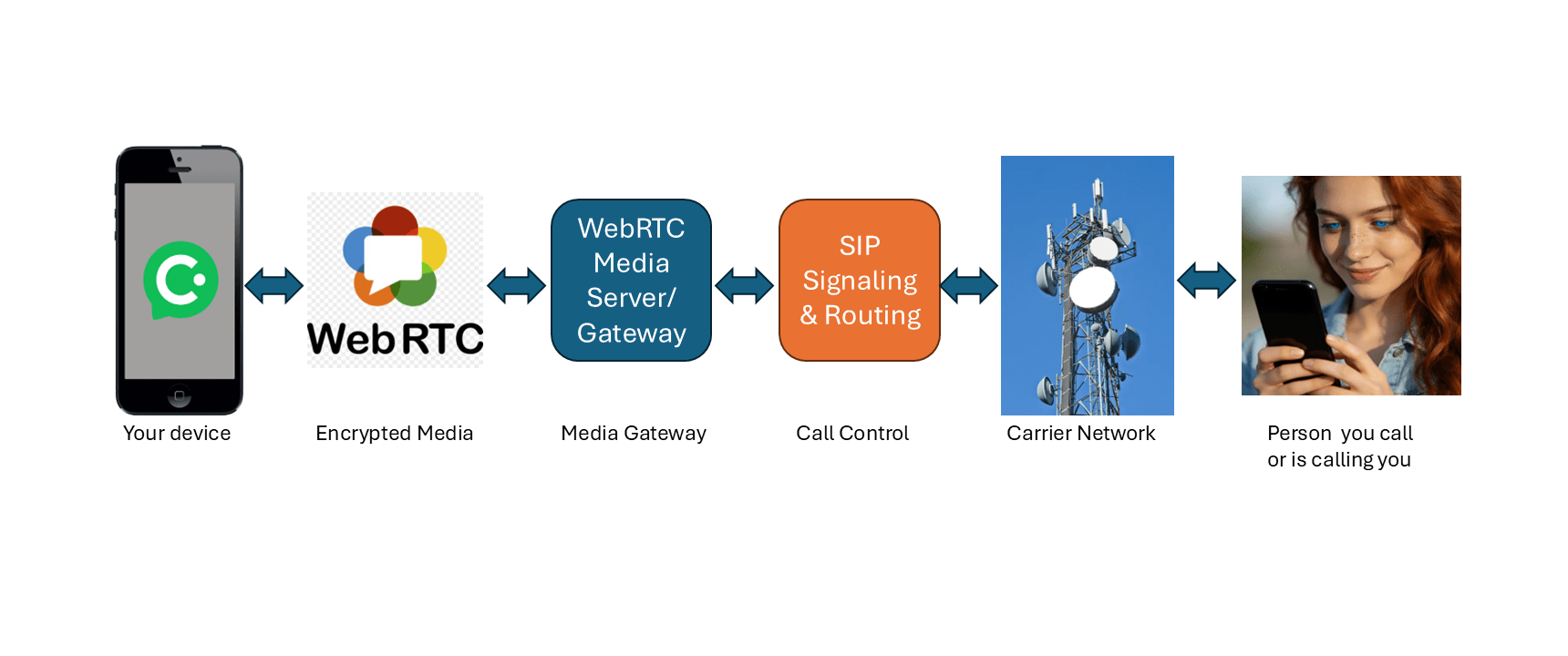
WebRTC = Encrypted Real-Time Communication for media over the internet
SIP = Session Initiation Protocol for telephony signaling & routing
- Number assignment. When you buy a virtual phone number, the service provider assigns you a real phone number and links it to your account, not to a SIM card.
- Network routing. When someone calls or texts your virtual number, the phone network routes that call or message to the our servers
- Internet delivery. Our servers sends the call or message over the internet to your app over your Wi-Fi or mobile data connection.
- App connection. Your app stays connected so calls and messages can ring instantly. Because the number isn’t locked to one device, you can use the same number on more than one device. On your phone, calls appears in the same way as calls where you SIM card is used.
Why use a Virtual Phone Number?
A virtual phone number gives you a second line inside your app, without a second SIM or a second phone. It’s a simple upgrade that makes everyday calling and texting more flexible.
Keep work and personal separate
Use one number for work and another for friends and family. Turn your work line availability on or off when you want to disconnect.
Protect your privacy
Share your virtual number when you don’t want to give out your primary number, for online marketplaces, deliveries, sign-ups, or new contacts.
Stay organized
Use different numbers for different parts of your life, so it’s easy to keep contacts and conversations separated.
Go global
A virtual number can also help you appear local in another country. You can choose a number with a specific country or area code, so people there can call or text you as if you’re nearby, often at local rates, without dealing with international dialing. It’s ideal if you travel often, work with clients abroad, or have friends and family in another country, because you keep a familiar “local” presence while managing everything from the same app.
About verification codes (OTP)
Many services allow OTP/verification codes to virtual numbers, while others block them. If OTP is important to you, check support for the specific number and country you choose.

More flexible than a regular phone number
The same number is accessible from anywhere in the world on multiple devices. Not associated with a physical phone

Advanced privacy control
Available only between 10am to 4pm Monday and Thursday? Easily control when your devices should ring

Forward calls
You may forward calls and SMS to another phone number. It’s even possible to transfer/move the number to another app user

Can be used on any device
Want to make and receive calls from your computer or tablet as well? Any device can become a phone with the app installed

Personalized voicemail
Each virtual number can have it’s personalized voicemail and receive voice messages

Flexible SMS
Don’t waste time copy-pasting SMS to your contacts, send them all at once with the group SMS feature
Benefits of Having a Virtual Number
Here are some popular reasons individuals and companies choose to set up one or more virtual numbers. You can also check our video library
Control multiple numbers from any device with an app
Provides a high level of privacy and anonymity
Can appear to be based in any country or region
It’s often more affordable than regular number subscriptions
Does everything a phone can do including call forwarding
Automated answering with pre-recorded voice messages
Route calls to multiple devices any time of the day or night
Offers great scalability for businesses,
no landline installation or SIM cards needed
Easy to acquire and manage within the app
No expensive handset needed for it to function
Allows cost control with visible call and SMS rates
Excellent for teams with remote staff
Improves work-life balance with separate numbers
Choose either a mobile or landline number depending on availability
Set your availability for the number with detailed options
Ability to block any contact numbers for privacy
Can turn a tablet or PC/Mac into a phone without a SIM card
A number can be transferred/moved to another app user
Helps in reducing or avoiding roaming cost when travelling
What is the difference between a Virtual Phone Number and a SIM Number?
A virtual phone number is fully digital and set up by installing an app, while a traditional SIM card is a physical chip you insert into your device or an eSIM that must be provisioned. A virtual phone number also works on multiple devices at the same time.
Virtual Phone Number | SIM | |
Phone Numbers | Many. Only limited by the provider | Up to Two |
Removal | One-click Remove | Remove the SIM Card |
Activation | Automatic | Manual (insert card or activate eSIM) |
Compatibility | Any device (Phone, Tablet, Laptop, TV) | Just one device |
Using Abroad | Affordable rates | May be expensive due to roaming |
Frequently Asked Questions about Virtual Phone Numbers
A virtual number is a telephone number that isn’t tied to a physical phone line. Instead, it exists in the cloud and can be used to make and receive calls on any device with internet access. call.com provides privacy, flexibility, and cost savings compared to traditional phone numbers. Learn more
Yes! call.com offers a wide selection of numbers from 8 countries. You can browse available numbers and choose one that suits your needs, whether you’re looking for a specific area code or even a memorable pattern. Learn more
Yes, you can make and receive international calls with your call.com virtual number. Our competitive international calling rates are significantly lower than traditional carriers.
Yes, one of the key benefits of call.com is that you can use your virtual number simultaneously on multiple devices. Install our app on your smartphone, tablet, and computer to make and receive calls from any device, with synchronized history and contacts.
When someone calls your virtual number, the service routes the call through the internet to your chosen device(s), such as a smartphone, tablet, or computer, using VoIP and cloud technology.
Yes. Once set up, your virtual number can be used simultaneously on any device where the app is installed, keeping your call history and contacts in sync across devices.
Yes. Most virtual number services allow you to send and receive SMS and other messages directly from the app.
Yes. Because virtual numbers are cloud-based and separate from personal phone numbers, they help protect your privacy by keeping your real number hidden from contacts.
Yes. Virtual phone number services commonly include call forwarding features, enabling incoming calls to be sent to voicemail or another number you specify.
No. You only need the provider’s app on your device; no extra phone lines or physical hardware are required.
Yes. You can add more than one virtual number to your account, which is useful for separating business, personal, or location-specific lines.
Yes. Because the number is cloud-based, you can use it from anywhere in the world with an internet connection.
Absolutely. They are often used by businesses to project a professional image, manage customer calls, and establish a local presence in different markets.
A virtual number uses internet-based routing (VoIP) and works on many devices, whereas a traditional number is tied to a specific physical line or SIM card.
Yes. While virtual numbers don’t require traditional phone line fees, providers typically charge for number activation and usage; costs vary by feature set and region.
Yes. Some services allow you to send the same message to multiple contacts at once directly from the virtual number interface.